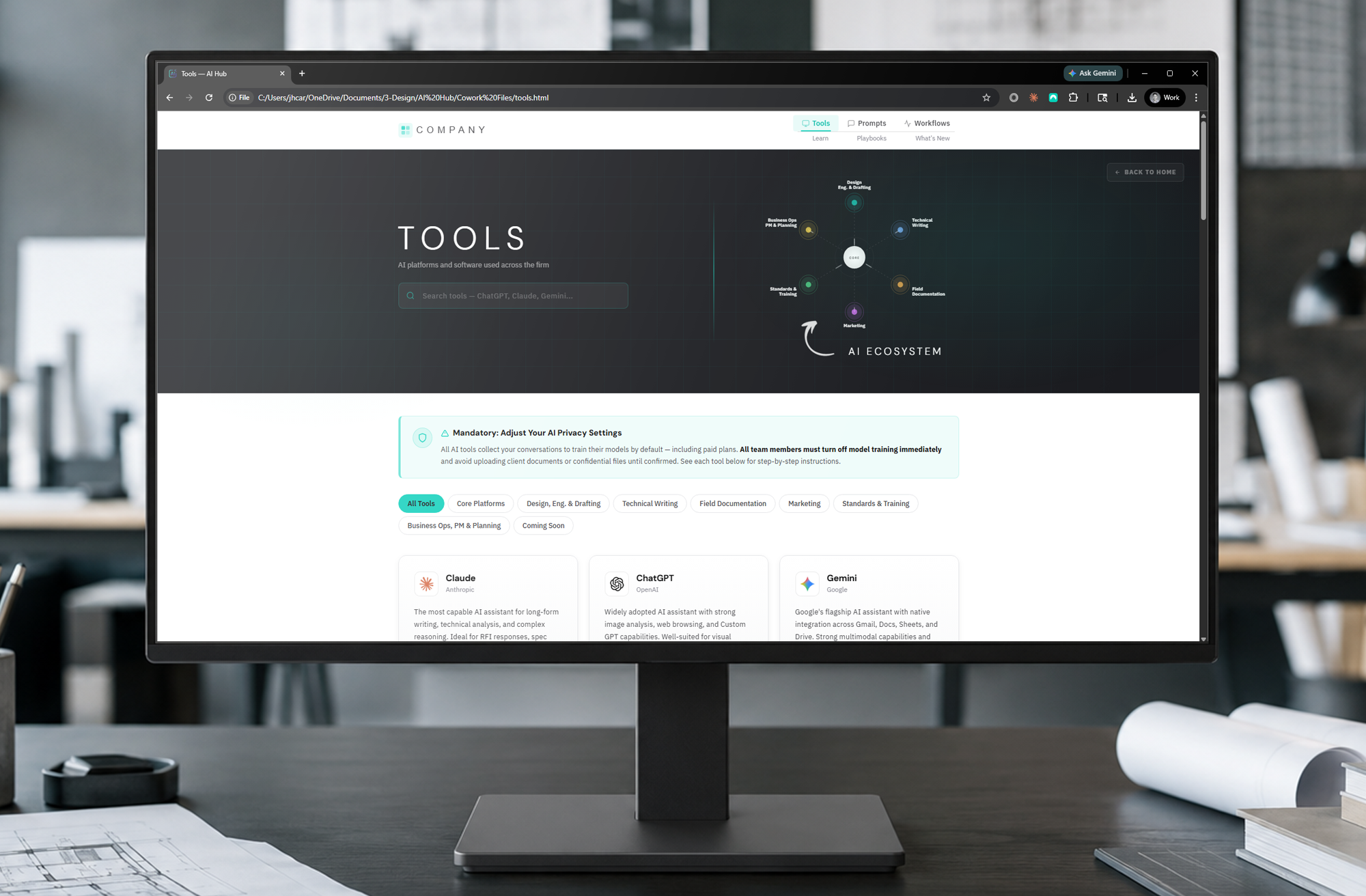
Stop guessing how to implement AI. Start leading it.

Become the hero who led your firm into AI — without spending months on strategy or hiring a consultant.

One-Time Purchase

|

Firm Customizable

|

Deploy in 2 Hours

THE REALITY AT MOST A&E FIRMS

Your team isn't avoiding AI. They don't know where to start.

A&E firms shouldn't have to choose between falling behind and figuring out AI from scratch. Your team deserves a path forward.
image of integrated communication platform (for a legal tech)

Inconsistent AI Use

Some staff use ChatGPT. Some Copilot. Most just Google. Every project gets a different approach, and quality suffers.

Unclear Liability

Without a written AI policy, your firm is one bad output away from a liability conversation no one wants to have.

image of ai course modules on screen

Wasted Time

Staff spend hours each week figuring out which prompts work. That's billable time disappearing into Reddit threads.

[interface] image of a tablet with software interface (for an ai developer tools)

Adoption Stalls Out

Without structure, AI initiatives die after the first all-hands. Three months later, nothing has changed.

WHAT YOUR FIRM GETS

Everything Your Team Needs. One Hub.

From the prompts your engineers use daily to the policies your principals approve once.

[interface] graphic design of app flow diagram (for a consumer apps)

Your command center for AI implementation and training.

marketing strategy meeting

Preloaded guidelines for every major AI tool in the A&E industry — Claude, ChatGPT, Copilot and more.
See your firm's AI ecosystem in a customizable visual diagram.

[interface] screenshot of core features (for an ai developer tools)

150+ ready-to-use prompts organized by role and project type. Architects, engineers, CAD, marketing — every team gets prompts tailored to their work, not generic AI templates.

[interface] screenshot of core features (for an ai developer tools)

Detailed timelines with AI touchpoints for the project delivery methods your team uses.
From Proposal to Construction Phase Services, see how you can maximize AI efficiency every step of the way.

[interface] screenshot of core features (for an ai developer tools)

Training modules that gets your team from AI-curious to AI-confident.
Reference libraries and Lessons Learned logs make sure your team never stops improving

[interface] screenshot of core features (for an ai developer tools)

This is YOUR hub. Add, remove, and customize content within the hub with no coding.
Your firm's logo, colors, and content updates happen in a visual interface.

WHAT YOU'RE ACTUALLY BUYING

A complete library of work-ready content.

Prompts, guides, and resources - Built by licensed A&E professional who figured out what worked. So your team doesn't have to.

150+

AI Prompts

Tested prompts for proposal writing, RFP analysis, drawing review, marketing copy, code coordination, client communication, and more. Organized by role and project type.

30+

AI Tool Guides

Detailed guides for every major AI tool — Claude, ChatGPT, Copilot, Gemini, and more. Where to use each, what to watch for, and how to get the best results.

10+

Resources & Templates

Firm AI policies, data privacy guidelines, client communication templates, professional liability checklists, and quick-reference cards your team can print and keep at their desks.

3

Training Modules

Training for beginners and advanced users alike. Includes professional ethics training for your executives peace of mind. Quizzes and completion tracking included.

100%

A&E-Native Content

Every prompt, guide, and resource is written specifically for the architecture and engineering practices. No generic business templates.

Yours to Customize

Replace the generic branding with your firm's logo, colors, and language. Edit any prompt, hide any section, add your own content with White-label rights.

TOOL GUIDES INCLUDED

HOW PRYMR WORKS

Three steps. One afternoon.

From the moment you download Prymr to the moment your team is using it — here's exactly how it happens.

image of ai educational tool interface on a tablet

01   |   Get Prymr

Download a single zip with everything inside. Content, code, and assets — all self-contained.
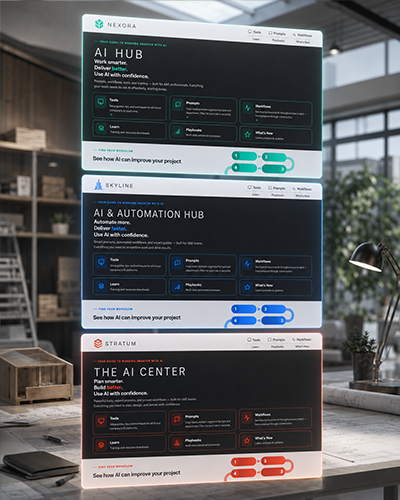
image of mission control room (for a space tech)

02   |   Make It Yours

Add your firm's logo, colors, and more through the visual admin panel. Edit, hide, or add content.

image of diverse team brainstorming (for an ai saas company)

03   |   Deploy & Lead

Drop it on SharePoint, Teams, or any browser. Share one link. Become the firm that figured out AI.

The transformation:

A firm where every architect, engineer, and project manager knows how to use AI confidently. Clear policies. Consistent prompts. Training that took an afternoon, not a year. And a leader who made it all happen — you.

WHAT MAKES PRYMR DIFFERENT
Built for the way A&E firms actually work.

image of a map pinpointing the clinic location (for a veterinary clinic)

Deploys in Under 2 Hours

No IT department required

image of diverse group collaboration (for a hr tech)

Runs On Your Network

Your data
never leaves

[digital project] image of a website (for an ai developer tools) in a real-life situation

One-Time Purchase

Own it forever,
updates optional

[digital project] image of a website (for an ai developer tools) in a real-life situation

Fully Customizable

Your brand, your content, your way

[digital project] image of a website (for an ai developer tools) in a real-life situation

Built by A&E Professionals

Not a tech
company guessing

Discover the perfect package for your firm.

 Explore our AI implementation packages for your firm's growth and success.
Minimum

$749

A focused starter hub for one discipline firms.
Get Started
FEATURES
Core Hub Dashboard
125+ Total A&E Prompts
45+ AI Tools Directory
1 Discipline (Arch, Struct, MEP, or Civil)
Complete Training Path with Quizzes
AI Output QA Checklist
Deployment Guide
Admin Panel with Brand Customization
Professional
Most Popular

$1,497

The full adoption system for a serious team.
Get Prymr
FEATURES
 Everything in Minimum, plus:
175+ Total A&E Prompts
All 4 Disciplines (Arch, Struct, MEP, Civil)
Full Policy & Governance Pack
AI Tool Evaluation Scorecard
12 Months of Quarterly Updates
All Workflow Templates
Managers Guide to AI Adoption
Principal

$2,249

Deployment for multiple disciplines & offices.
Get Prymr
FEATURES
Everything in Professional, plus:
Unlimited Installs, Multiple Offices
White-Label Rights
Standard-of-Care Memo
AI Implementation Roadmap
AI in Project Lifecycle Map
24 Months of Quarterly Updates
Priority Email Support
Free

$0,00/year

Ideal for solo creators and small teams
Start for Free
FEATURES
1 user seat
Basic AI assistance
Limited Brand Voice
Email support
Basic analytics
Professional
Most Popular

$4499/year

Best for growing startups and collaborative teams
Sign Up with Professional
FEATURES
Everything in Creator, plus:
3 user seats, expandable up to 5
3 Custom Brand Voices
Content performance insights
Team collaboration tools
Enterprise

$9999/year

Perfect for large enterprises needing advanced features and support
Sign Up with Enterprise
FEATURES
Everything in Pro, plus:
Unlimited user seats
Dedicated account manager
Advanced analytics dashboard
Customizable workflows
Minimum
Professional
Principal

Core Hub

Core Hub Dashboard
Central landing page linking every tool, prompt, and resource.
Discipline Coverage
Architecture, Structural, MEP, Civil.
1 discipline
All 4
All 4
License Scope
How many offices and installs the purchase covers.
Single office
Single office
Unlimited Installs
Admin Panel with Brand Customization
Set colors, logo, and firm name — no code required.
White-Label Rights
Remove all Prymr branding and present the hub as your own.
-
-

Prompts & Playbooks

A&E Prompt Library
Ready-to-use prompts written for architecture and engineering tasks.
125+ prompts
175+ prompts
175+ prompts
Advanced Techniques "Playbooks"
Step-by-step guides for higher-value, multi-step AI workflows.
Role-Based Prompt Packs
Prompt sets grouped by role: PM, principal, drafter, marketing.
Workflow Templates
Reusable templates for common, repeatable firm processes.
1 discipline
All
All

AI Tools Directory

AI Tools Directory
Vetted catalog of AI tools relevant to A&E work.
45+ tools
45+ tools
45+ tools
Tool Start-Up Guides
Quick setup and first-use guide for each listed tool.
Model Comparison Matrix
Side-by-side comparison of major AI models for firm use.
AI Tool Evaluation Scorecard
Rubric for vetting new AI tools before adopting them.
-

Training & Onboarding

Training Modules with Quizzes
Structured lessons with knowledge checks to build staff competency.
AI Readiness Self-Assessment
Short questionnaire that gauges your firm's starting point.
Prompt Engineering Cheat Sheet
One-page reference of prompting patterns and fixes.
New-Hire AI Onboarding Checklist
Steps to get new staff using the hub on day one.
-

Policy, Governance & Risk

AI Output QA Checklist
Review steps before AI-assisted work enters a deliverable.
Data Privacy Guidelines
What firm and client data is safe to put into AI tools.
AI Policy Template (Short)
One-page AI use policy your firm can adopt quickly.
AI Policy Template (Long)
Comprehensive AI policy covering use, review, and disclosure.
-
"Is This Output Safe?" QA Decision Card
One-page flowchart for judging whether AI output is usable.
-
Standard-of-Care Memo (AI in Licensed Practice)
How AI use intersects with professional standard of care.
-
-

Management & Measurement

Managers Guide to AI Adoption
Playbook for leaders rolling AI out across a team.
AI Maturity Levels Infographic
One-page map of the stages of firm AI adoption.
-
AI Implementation Roadmap
Phased plan for firm-wide rollout over time.
-
-
AI in Project Lifecycle Map
Where AI fits across project phases, with risk flags.
-
-

Deployment & Updates

Deployment Guide
How to deploy the hub: SharePoint, Google Drive, or local.
Quarterly Updates Included
New prompts, tools, and content added each quarter.
None
12 months
24 months
Annual Update Renewal
Optional yearly subscription to keep content current.
Add-on
Renews after Year 1
Renews after Year 2
Priority Email Support
Faster email response for setup and questions.
-
-

ZERO RISK

Get your money back. Keep everything.

We're so confident in Prymr that we'll refund every cent if it doesn't transform how your team works. No questions. No catches. No clawbacks.

  •      Full refund within 30 days
  •       Keep the hub, prompts, and all content
  •       Email us. Get refunded. That's it.

QUESTIONS, ANSWERED

The questions we get most often.

Everything you need to know before you click "Get Prymr."

Still on the fence? Email us and we'll talk you through it.

ONE LAST THING

Next Monday, your firm could be leading with AI.

You've seen the prompts. You've seen the price. You've seen the guarantee. The only question left is whether your firm is the one that figures AI out — or watches your competitors do it first.

30-day guarantee. Full Refund. Keep the hub forever.